Here we have my first flowchart of my menus of my planned portfolio

This is my first flowchart as a my concept of my online portfolio, this would allow me to show off my models, this would allow them to see my models and my texturing skills to show what I can do for what materials on my portfolio. This is my layout is simplistic however it immediately splits a big difference because it directs people to see my work or about myself which would be very good for me as it keep me focused on annotation my work and not on myself however it still allows myself to talk about myself for employers to have a look at. however is still quite limiting on the stuff I can show
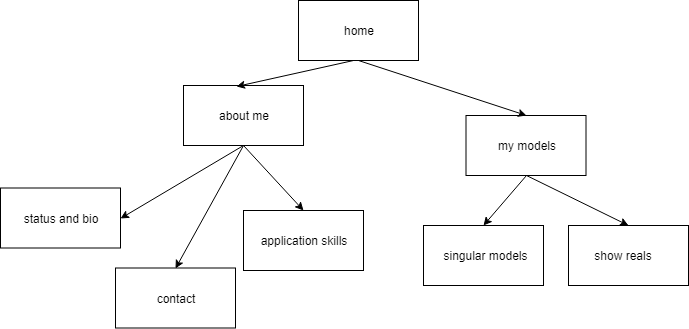
Here I have my second flow diagram of my portfolio. In my first looks I can see a good change in the models section, instead of doing just textured and untextured models I can include different elements such as dioramas and single objects so I would be able to show my skills in a range of different types of models showing my understanding of 3D modeling to be more developed.
Setting up my portfolio (sketchFab)
Here I am about to set up my online portfolio, because I have chosen SketchFab as my portfolio provider I have to set up an account and make sure to set up everything before I start uploading my range of models.


Here I have started to set up my page on sketch fab in order to make my online student portfolio. As I am creating a new account. The first thing I had to do was to create my username and log in details which consisted of an email and password, this was simple as long as I make sure to store them on my password file. After filling those out I agreed to the terms and conditions and clicked create account. After that you can start uploading models, however because this was my student portfolio I decided to customize mt profile to give myself my character in case it catches the eye of employers. The first thing I decided to do was to set up my profile picture, since I had no images of myself that I like or ones that are just of me I have decided to use the same image as my Facebook profile picture, this way i can link my Facebook to my sketch fab to people can see what I am like as a person and now just as a modeling, letting them see more of me so they can decide if they like me or not. after this the only thing left to do before uploading is the profile editing, this is where I have to talk about myself, I have to give myself bio, my location so people can find me, ways to contact me as well as connected account to other social media such as twitter or Facebook as well as other things like applications I can use to make and texture models.
Since I have now made my new portfolio I can not put all of my 3D models with texture and do annotations to show views what I was making and put what I think would be appropriate to say about my model as well as point I could as to my pieces
 Adam Nunns 2nd year Wordpress blog